When the person who set up production leaves, the first risk is not missing documentation. It is unknown control: nobody can say who can deploy, restore data, change DNS, read an alert, or approve a bill.
Forte helps reduce that dependency on personal knowledge by keeping the Service's repository, deployment history, configuration, and request diagnostics in a consistent console workflow. The next engineer has a documented place to start when releasing a change or investigating a customer issue. This 30-day runbook applies that approach to recovering operational ownership; migration and recovery work may take longer.
First 48 hours: secure administrative access
Confirm company-controlled access to the source host, cloud provider, domain registrar, DNS, identity provider, payment provider, database, monitoring, email/SMS delivery, secrets, and billing. Replace personal accounts with organizational ownership where the provider supports it.
Do not copy credentials into the handover document. Record the access route, account owner, recovery contact, and last verification instead.
| System | Business purpose | Administrative owner | Access verified | Recovery route |
|---|---|---|---|---|
| Source repository | Build input | |||
| Runtime platform | Customer traffic | |||
| DNS and registrar | Public routing | |||
| Primary database | Customer data | |||
| Identity | Customer access | |||
| Payments | Revenue |
Review active users, service accounts, API keys, deploy keys, and emergency contacts. Revoke access that is no longer needed, using a staged approach when ownership is uncertain. A destructive “rotate everything now” response can break production dependencies whose consumers have not been identified.
Week one: reproduce a release
For a Service already running on Forte, open its deployment history and follow a release from the selected source revision into build output and health results. Then locate the runtime configuration and request diagnostics. That gives the incoming engineer a repeatable investigation path without first learning the conventions of a bespoke pipeline.
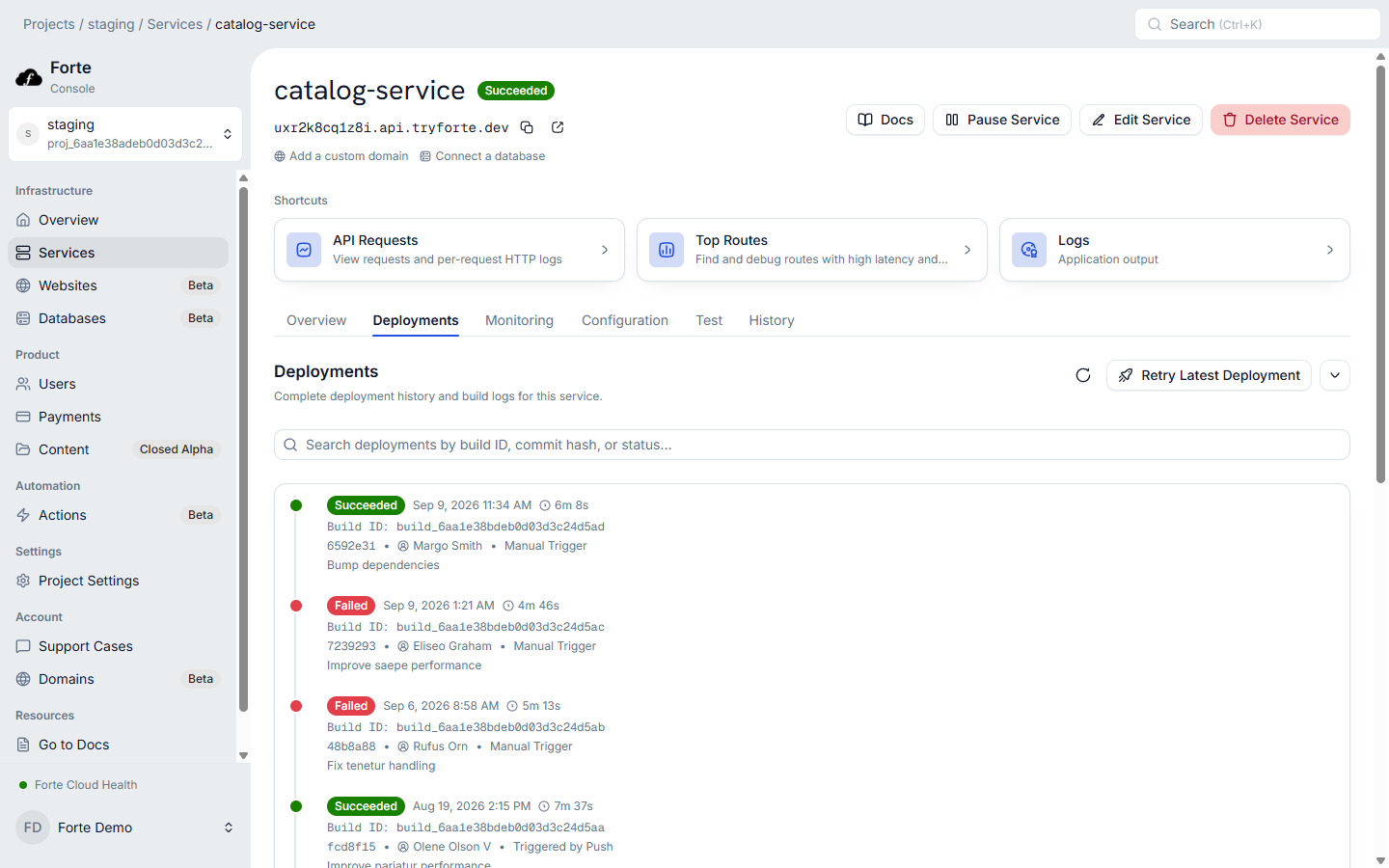
Map the path from a source commit to customer traffic. Identify the production branch, build definition, runtime configuration, secrets, health check, artifact, rollout mechanism, and rollback path.
Deploy a harmless application change through the normal process. Record who approved it, where logs appeared, how health was decided, and which version served traffic afterward. If the team cannot reproduce a routine release, treat that as an active operational risk.
On Forte, a Service ties a repository and branch to a managed build and deploy workflow. Build and deployment history remain visible on the Service, and eligible failed updates can return to a prior healthy revision. Your team still owns application compatibility and database migrations.
Week two: test recovery
Inventory databases, object storage, queues, scheduled work, external APIs, and payment-event delivery. For each stateful dependency, record backup frequency, retention, restore procedure, recovery owner, and the application behavior during recovery.
Run a restore exercise in a safe environment. Confirm that the restored data is usable by the application, not merely that a backup file exists. Test one failed application deployment and locate one deliberate failing request in the diagnostic system.
Forte managed databases are Open Beta and currently use daily backups with support-assisted restores. If that path does not meet the product's recovery requirements, resolve the gap before considering the handover complete.
Week three: reconnect alerts to decisions
For each alert, identify the symptom, affected customer path, first diagnostic view, decision owner, and escalation route. Remove alerts that nobody can act on and add coverage for customer-visible failures that currently rely on support reports.
Check certificate renewal, domain changes, storage capacity, database connections, error rate, latency, failed background work, and payment-event failures. Ensure notifications go to a maintained team destination rather than the departing engineer's inbox.
Week four: make ownership durable
If the current stack relies on undocumented scripts and several separately administered tools, evaluate moving a suitable Service to Forte after access and recovery are under control. Consolidation makes future handovers smaller when release history and operating evidence follow the resource. It does not reconstruct missing business knowledge, so keep the application-specific service record below.
Review invoices and commitments, assign renewal owners, and document the expected monthly range. Consolidate systems where an extra boundary has no clear benefit, while preserving tools whose specialized capability the team uses.
Finish with a short service record for each customer-facing system:
- Purpose and customer impact
- Repository and production branch
- Runtime and data dependencies
- Deployment and rollback path
- Health and diagnostic signals
- Backup and restore path
- Administrative owner and escalation contact
- Known limits and current follow-up work
Store the records with access controls that survive personnel changes. Schedule a quarterly release and recovery exercise so the handover does not become another stale document.
If the current AWS credit balance is also changing, use the credit-expiration checklist during the cost review. To reduce the number of separately owned infrastructure surfaces, review Forte Compute and migration support.